Learn how one free tool – Zotero Software – can transform the way you research, write assignments, and complete your final-year project.
Whether you are writing your first assignment, preparing a National Diploma (ND) project, or working on a Higher National Diploma (HND) dissertation, one challenge every student eventually faces is managing references and citations. Losing track of journal articles, forgetting where information came from, or spending hours formatting references manually are common frustrations.
Fortunately, there is a solution.
The Zotero software is one of the world’s most popular free reference management applications. It helps students, lecturers, and researchers collect research materials, organize sources, generate citations automatically, and create perfectly formatted bibliographies in just a few clicks. Zotero is a free, open-source research assistant that can collect, organize, annotate, cite, and share research materials while integrating directly with Microsoft Word, Google Docs, and LibreOffice.
In this guide, you’ll learn:
- What Zotero is
- Why students should use it
- Its key features
- How to install and use it
- Tips for getting the most out of Zotero
- Why software engineering students should master research software like Zotero
What Is Zotero Software?
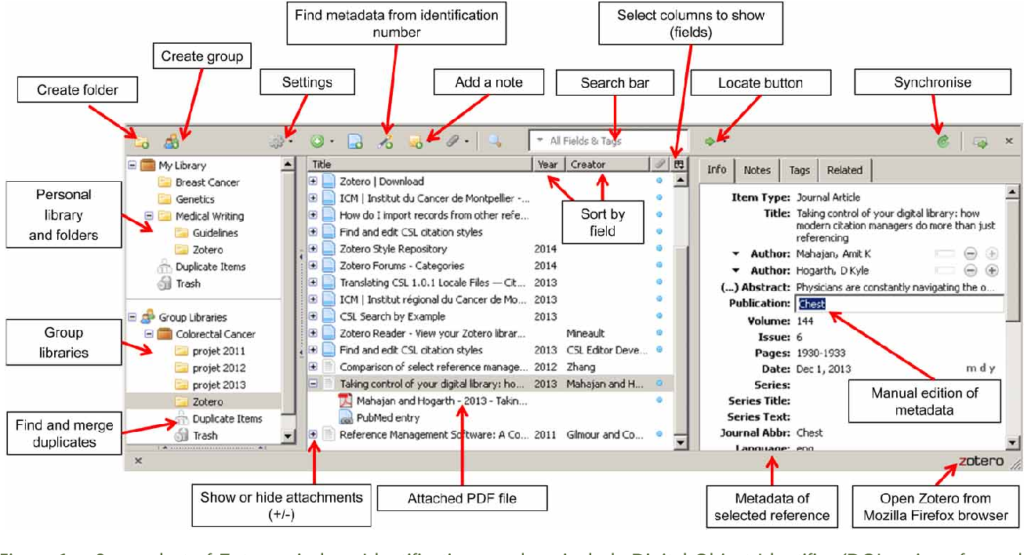
Zotero (pronounced “zoh-TAIR-oh”) is a free reference management software designed to help people collect, organize, cite, and share research sources.
Instead of manually typing references every time you write an assignment, Zotero stores all your books, journal articles, websites, conference papers, reports, videos, and other sources in one organized digital library.
Whenever you need a citation, Zotero inserts it into your document automatically and updates your bibliography instantly.
Think of it as your personal digital research librarian.
Why Was the Zotero Software Created?
Academic writing requires proper referencing.
Whether your institution requires:
- APA
- MLA
- Harvard
- Chicago
- Vancouver
or thousands of other citation styles, formatting references manually can be tedious and error-prone.
Zotero was developed to make academic research easier by helping students:
- Save references with one click
- Organize research papers
- Keep PDFs together with citations
- Insert citations automatically
- Generate bibliographies instantly
- Collaborate with classmates
Today, millions of students and researchers worldwide rely on Zotero for their academic work. It supports more than 9,000 citation styles and works across major desktop and mobile platforms.
Why Every Student Should Use Zotero
Imagine writing a 100-page dissertation with over 150 references.
Without Zotero, you would need to:
- Type every citation manually
- Arrange bibliography alphabetically
- Check punctuation
- Italicize titles correctly
- Update numbering every time you add a new source
Now imagine clicking one button and letting software do all that work.
That’s exactly what Zotero software does.
Students who use Zotero often experience:
- Faster assignment writing
- Better organization
- More accurate citations
- Reduced plagiarism risk
- Easier literature reviews
- Less stress during project writing
Key Features of Zotero Software
1. Collect Research with One Click
Using the Zotero Browser Connector, you can save:
- Journal articles
- Books
- Newspapers
- Research papers
- Government reports
- Websites
Instead of copying URLs into Word documents, Zotero automatically captures important information such as:
- Title
- Author
- Publication
- Publisher
- DOI
- ISBN
- Publication date
2. Organize Everything
As your research grows, Zotero allows you to organize sources into:
- Collections
- Sub-collections
- Tags
- Saved searches
For example:
My Research

   Programming

   Artificial Intelligence

   Software Engineering

   Database Systems

   Machine Learning
Finding a source later becomes effortless.
3. Store PDFs
Zotero doesn’t only save references.
It can also store:
- PDF articles
- Research papers
- E-books
- Reports
Everything stays together inside one organized library.
4. Annotate PDFs
Recent versions of fthe Zotero software include a built-in PDF reader that allows you to:
- Highlight text
- Underline important sections
- Add notes
- Create annotations
No additional PDF software is required.
5. Generate Citations Automatically
Perhaps Zotero’s biggest strength is automatic citation generation.
Simply click Add Citation inside Microsoft Word or Google Docs.
Choose the reference.
Done.
Zotero formats it correctly.
Supported styles include:
- APA 7th Edition
- MLA
- Harvard
- Chicago
- IEEE
- Vancouver
…and thousands more.
6. Zotero Software Creates Bibliographies Instantly
Finished writing?
Click Add Bibliography.
Zotero automatically creates a perfectly formatted reference list.
Even better, if you add or remove citations later, the bibliography updates automatically.
7. Sync Across Devices
You can access your library from:
- Desktop
- Laptop
- Mobile phone
- Tablet
Your notes and references stay synchronized when you choose to enable syncing.
8. Use Zotero Sofware to Collaborate with Others
Working on a group project?
The Zotero software lets students create shared libraries where team members can collect and organize references together at no cost.
How to Install Zotero Sofware
Getting started is simple:
Step 1
Download Zotero from its official website.
Step 2
Install the desktop application.
Step 3
Install the browser connector for Chrome, Firefox, Edge, or Safari.
Step 4
Install the Microsoft Word or Google Docs plugin if it is not already enabled.
Step 5
Create a free account if you want to synchronize your library across multiple devices.
How Zotero Works
Suppose you are researching:
“Artificial Intelligence in Healthcare”
Instead of copying dozens of links into Word:
- Search Google Scholar or your library database.
- Click the Zotero browser icon.
- Save the article.
- Repeat for every source.
Later, while writing your paper:
- Click Add Citation
- Search the article
- Press Enter
Citation inserted.
When finished:
Click Add Bibliography.
Your references are generated automatically.
Citation Styles Supported by Zotero
Zotero supports thousands of citation styles, including:
- APA
- Harvard
- MLA
- Chicago
- IEEE
- Vancouver
- ACS
- AMA
This makes it suitable for students in:
- Computer Science
- Software Engineering
- Medicine
- Business
- Education
- Law
- Engineering
- Social Sciences
Advantages of Zotero
Students choose Zotero because it is:
- Completely free
- Open source
- Easy to learn
- Cross-platform
- Reliable
- Highly customizable
- Compatible with Microsoft Word
- Compatible with Google Docs
- Suitable for individual and group research
Zotero vs Manual Referencing
| Manual Referencing | Using Zotero |
|---|---|
| Time-consuming | Fast |
| Easy to make mistakes | Highly accurate |
| Difficult to update | Updates automatically |
| Hard to organize | Organized library |
| Manual bibliography | One-click bibliography |
Tips for New Zotero Users
If you’re just starting:
- Organize sources into collections.
- Use descriptive tags.
- Keep PDFs attached to references.
- Back up or sync your library regularly.
- Learn keyboard shortcuts.
- Use the browser connector whenever you conduct online research.
Developing these habits early will save countless hours over the course of your academic journey.
Why Software Engineering Students Should Learn Zotero
At first glance, Zotero may appear to be a tool only for researchers. In reality, it is an essential productivity tool for aspiring software engineers.
Software Engineering students regularly work with:
- Technical documentation
- API references
- Research papers
- IEEE publications
- Software architecture books
- Open-source project documentation
- Standards and specifications
Managing these resources efficiently is a valuable professional skill.
Beyond academic writing, learning to use tools like Zotero demonstrates an appreciation for structured information management, digital workflows, and efficient knowledge organization—qualities that are highly valued in the software industry.
Build These Skills at Buea Institute of Technology
At Buea Institute of Technology (BIT), students are encouraged to master not only programming languages but also the digital tools that support modern software development, research, collaboration, and lifelong learning.
Our programmes emphasize practical, industry-oriented training that prepares graduates for today’s technology careers.
Higher National Diploma (HND) in Software Engineering
The HND in Software Engineering equips students with advanced technical skills in:
- Software design and development
- Object-Oriented Programming
- Database systems
- Mobile application development
- Web technologies
- Cloud computing
- Cybersecurity fundamentals
- Artificial Intelligence concepts
- Software testing and quality assurance
- Team collaboration and project management
Throughout the programme, students complete substantial software projects and research assignments where tools like Zotero can simplify literature reviews, documentation, and citation management.
Learn more about the programme here:
National Diploma (ND) in Applications Development
If you’re beginning your journey into software development, BIT’s National Diploma in Applications Development provides a strong foundation in:
- Computer programming
- Web application development
- Database management
- Software testing
- User interface design
- Problem-solving techniques
- Systems analysis
- Modern development tools
Students gain hands-on experience building real-world applications while developing professional documentation and technical reporting skills that benefit from effective reference management.
Discover the programme here:
Final Thoughts
Academic success is not only about working hard—it is also about working smart.
Zotero eliminates one of the most time-consuming aspects of academic writing by helping you collect, organize, cite, and manage research efficiently. Whether you’re preparing a short assignment, a capstone project, or a dissertation, learning Zotero early can save you many hours and improve the quality of your work.
At the same time, developing strong digital research habits complements the practical software development skills taught at Buea Institute of Technology. If you’re passionate about building applications, solving real-world problems, and preparing for a career in technology, BIT’s Higher National Diploma in Software Engineering and National Diploma in Applications Development offer the knowledge, practical experience, and industry-focused training to help you succeed.
Ready to start your journey? Explore our programmes and discover how BIT can help you build the skills needed for today’s fast-evolving digital world.